Integrations / Browser Extension
The ToHuman browser extension for Chrome and Edge
Select text anywhere — a Google Doc comment, an email draft, a CMS field — right-click, and choose “Humanize with ToHuman”. The rewrite lands in the extension popup with one-click Copy, or Replace selection when you selected inside an editable field. One package, works in Chrome and Edge. Working inside ChatGPT specifically? The extension is one of three routes — the ChatGPT plugin, skill and MCP routes page covers the agent skill and the MCP connector too.
What it does
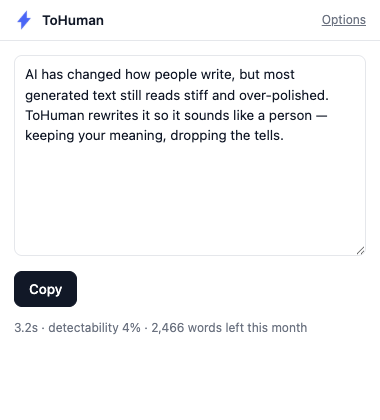
The extension adds a single entry to the right-click menu on selected text: Humanize with ToHuman. Click it and the selection is sent to your own ToHuman account through the official API — the same rewrite engine behind the web tool and the REST API. The result opens in the popup with the processing time, a detectability estimate, and your remaining monthly words, alongside two actions:
- Copy — the humanized text goes to your clipboard.
- Replace selection — if you selected inside an input, textarea, or rich-text editor, the extension swaps the original text for the rewrite in place.
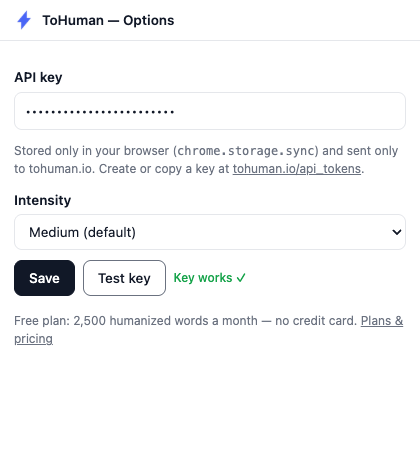
It runs on your own API key, created at tohuman.io/api_tokens. Each request handles up to 2,000 words, and the free plan includes 2,500 humanized words a month — no credit card. Intensity (minimal, subtle, medium, heavy) is configurable on the options page.
Install in Chrome (load unpacked)
The extension isn't on the Chrome Web Store yet (store listings are in progress — see the status below), so you install it the way extension developers do. It takes about two minutes:
- Download the zip and unzip it — you get a folder with
manifest.jsoninside. - Open
chrome://extensionsin the address bar. - Enable Developer mode (toggle, top-right corner).
- Click Load unpacked and select the unzipped folder.
- Open the extension's Options page and paste an API key from tohuman.io/api_tokens. Save, then hit Test key.
Install in Edge
Same package, same flow — Edge runs Chromium extensions natively:
- Download the zip and unzip it.
- Open
edge://extensionsin the address bar. - Enable Developer mode (left sidebar).
- Click Load unpacked and select the unzipped folder.
- Open Options, paste your API key, save, and test.
You'll need a free tohuman.io account — sign up and you have an API key in about 30 seconds. Free forever — 2,500 humanized words a month, no credit card. Requests over 2,000 words are rejected by the sync endpoint, so split very long documents.
Privacy
The selected text is sent only to tohuman.io — nowhere else. Your API key is stored in your browser's extension storage and is only ever sent to tohuman.io. No analytics, no tracking, no third-party requests: the extension only touches a page when you invoke it from the right-click menu.
Status & other integrations
- Chrome Web Store / Edge Add-ons listings — coming soon. Until then, the load-unpacked install above is the supported path.
- WordPress plugin — submitted to WordPress.org, in review.
- ChatGPT plugin, agent skill and MCP connector — the other three ways to run ToHuman in an AI workflow, including the OpenAI directory status, are on the ChatGPT plugin, skill and MCP routes page.
Built by the ToHuman team.