Integrations / ChatGPT
ToHuman for ChatGPT: the humanizer plugin, skill, and MCP connector
ToHuman rewrites AI-generated text so it reads like a person wrote it. Three ways to run it inside a
ChatGPT workflow: a browser plugin that puts a right-click Humanize entry on chatgpt.com,
the humanize-text agent skill, and our MCP connector. Below: what each one is, whether it
works today, and what it costs. If you only want one paragraph fixed,
paste it on the homepage — 700 characters, no account.
Browser plugin
Right-click any selection on chatgpt.com → Humanize with ToHuman → replace in place. Chrome and Edge.
Works today? Yes — manual install.
humanize-text skill
An Agent Skill folder that Codex, Claude Code, Cursor and GitHub Copilot load on demand.
Works today? Yes — curl + unzip, your own API key.
MCP connector
https://tohuman.io/mcp — one humanize tool, streamable HTTP.
Works today? Yes in Claude and Cursor; in ChatGPT via developer-mode connectors, with your own key.
Is ToHuman an official ChatGPT plugin?
Not yet — and the honest version starts with a correction most pages on this query get wrong.
OpenAI wound down the 2024 plugins beta; what replaced it is MCP-based connectors and apps, submitted
through OpenAI's current plugin flow. That is the kind of thing we built: our MCP server has been live at
https://tohuman.io/mcp since August 4, 2026, verified end to end against the MCP Inspector
and Claude Code, and the directory listing pack is written and waiting to go into that flow.
What it is not: listed. The submission is queued behind our own OpenAI organization verification — a step on our side, not theirs. So there is no store badge here and no install button that drops ToHuman into ChatGPT for you. Using ToHuman inside ChatGPT today means adding it yourself — the browser plugin below, or a connector you configure with your own API key. When the listing lands, this section changes and we will date the change.
How to use ToHuman in ChatGPT right now
The browser plugin — the route that works for everyone
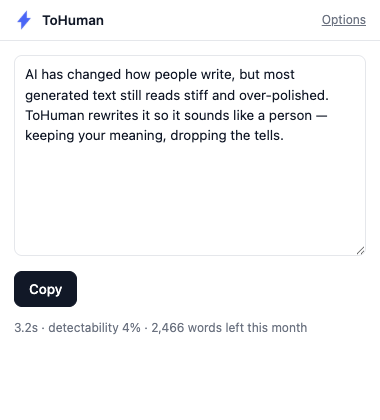
Select text anywhere on chatgpt.com — a reply you asked for, a draft it just produced — right-click, and choose Humanize with ToHuman. The rewrite lands in the popup with the processing time, a detectability estimate and your remaining monthly words, plus two buttons: Copy, or Replace selection when you selected inside an editable field. It runs through your own account on the same API as everything else here.
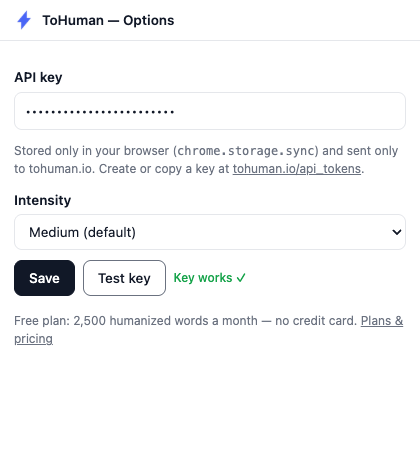
One caveat, plainly: it is not on the Chrome Web Store yet, so you install it the way extension developers do — download the zip, enable Developer mode, Load unpacked, paste an API key. Same package for Chrome and Edge. The two-minute install steps live on the extension page rather than being repeated here.
Custom MCP connector — advanced, and you bring your own key
OpenAI's Apps SDK documents connecting an MCP server to ChatGPT in developer mode. Point that flow at
https://tohuman.io/mcp and send the header Authorization: Bearer YOUR_KEY,
using a key from your ToHuman account. Two things to know first. OpenAI gates developer-mode connectors
by account and workspace policy, so availability is theirs to decide, not ours — and the client we
document end to end is Claude, not ChatGPT. And the connector needs your own API key:
the server answers a tools/list without authentication, but a humanize call without a key
returns This tool needs a ToHuman API key (checked again September 7, 2026). There is no
paste-the-URL-and-go mode. Keys are free; the API quickstart has
the 30-second version. If you want to see what the humanize call returns before you make a
key, try the API playground — it runs the same sync endpoint the
connector uses, in the browser, no signup.
Add ToHuman to ChatGPT as a connector (skill)
The vocabulary is the first obstacle. ChatGPT calls these things connectors; the agent-tooling world calls them skills; the searches that land on this page run every permutation of both — ChatGPT humanizer skill, skill humanizer ChatGPT, ChatGPT skills humanizer. They all describe the same job: give the model a tool it can call mid-conversation instead of making you leave the chat. For ToHuman that tool is the MCP server, and here is how to add a humanizer skill to ChatGPT with it, in the version that works today.
- Get a free ToHuman API key. Sign up, then Dashboard → API Tokens. The free plan is 2,500 humanized words a month, no credit card.
- Turn on developer mode for connectors in ChatGPT. Settings → Connectors → Advanced. OpenAI gates this by plan and workspace policy, so whether the option appears is their decision, not ours.
- Create a custom connector pointed at our MCP server. Name it
ToHuman, set the server URL tohttps://tohuman.io/mcp, and choose streamable HTTP as the transport. - Paste your own key as the authentication header —
Authorization: Bearer YOUR_KEY. This step is not optional. The server answers discovery (initialize,tools/list) without credentials, but a humanize call with no key returnsThis tool needs a ToHuman API key, re-checked against the live endpoint on October 6, 2026. - Enable the connector in a chat and ask for it by name — “humanize this with ToHuman”. It exposes one tool,
humanize(text, intensity), withintensityset tominimal,subtle,medium(default) orheavy, and a ceiling of 2,000 words per call.
What those five steps are not: a one-click install, a vetted entry in anyone's catalog, or a connection that works without your own key. If developer mode is not available to you, the browser plugin above is the route that needs no cooperation from OpenAI at all, and the per-client MCP setup tutorial covers the clients where the same connector is a single command.
The humanize-text skill for Codex, Claude Code, Cursor and Copilot
Since August 11, 2026 we publish humanize-text, an Agent Skill in the open
SKILL.md format — developed by Anthropic, released as an open standard, and now read
by Codex, Claude Code, Cursor and GitHub Copilot. If you want the writing side rather than the tooling
side, how to humanize ChatGPT text covers the manual and
prompt-level methods.
What is a humanizer skill?
A skill is a folder, not an app: instructions the agent loads only when a task matches — "the user asked me to humanize something" — plus a stdlib-only Python script that POSTs the text to our API. Ours bundles the intensity guidance, the chunking rule and an error table, so the agent knows what to do on a 429 instead of guessing.
How do I add the humanize-text skill?
Install the skill
curl -L -o /tmp/ht.zip https://tohuman.io/skills/humanize-text.zip
unzip /tmp/ht.zip -d ~/.claude/skills/   # Codex reads ~/.agents/skills/
export TOHUMAN_API_KEY=YOUR_KEY          # free plan: 2,500 words a month
Then ask your agent to humanize something and it loads the skill itself. The limits, plainly:
it runs on your own key, so the free plan's 2,500 words a month is the ceiling. It caps at 2,000 words per
call. It is slow — our smoke tests on one 69-word paragraph took 8 seconds on medium and
118 seconds on minimal, so budget minutes, not seconds. And it is not listed in any skill
directory yet: the zip is the install path, which means nobody is vetting it for you but us.
MCP for Claude, Cursor and other clients
Outside ChatGPT, the connector is one command. The endpoint is a hosted remote server — nothing to run locally.
Add the connector in Claude Code
claude mcp add --transport http tohuman https://tohuman.io/mcp \
  --header "Authorization: Bearer YOUR_KEY"
It exposes one tool, humanize(text, intensity) — intensity being minimal,
subtle, medium (default) or heavy — with a ceiling of 2,000
words per call. The same config shape works in Claude Desktop, Cursor, Windsurf and Codex; clients that
only launch local stdio servers can bridge through the open-source mcp-remote adapter. For
per-client config files, use the per-client MCP setup tutorial;
for the reasoning, read why we host an MCP server at all.
Humanizing code ChatGPT wrote
Is there a tool that can convert ChatGPT code to human code?
Not this one, and it is worth being precise about why. ToHuman is a prose humanizer — the model is fine-tuned on sentences, and what it changes is sentence rhythm, word choice and structure. What makes generated code look generated is different: boilerplate, naming conventions, over-explained comments, defensive scaffolding nobody asked for. Renaming variables is refactoring, not humanizing, and we will not claim a rewrite of your logic that we cannot do.
What it does do is the prose that ships with the code, which is usually where the AI tell actually lives: the README, the docstrings, the commit message, the PR description, the changelog entry, the comments — the parts a reviewer reads as writing. Those are complete sentences, the input shape the model was trained on. Paste a function body in and you get a mangled function body back.
The longer version of this answer — what the detectors actually measure, why a file of Python does not even meet Turnitin's word minimum, and how fenced code blocks survive a README rewrite — is on our page about whether a ChatGPT code humanizer is a real thing.
The practical version at volume: humanize the documentation step in your pipeline, not the source file. The deeper pipeline route shows how to wire the call into a script instead of a UI.
ChatGPT humaniser (UK spelling)
If you searched for a ChatGPT humaniser with an s, you are in the right place — same tool, we just spell it the American way in our own copy. British, Irish and Australian spelling goes in and comes back out intact: the humanizer does not convert your spellings, so "organised" stays "organised" rather than turning American on you. The one exception is a heavy rewrite, which changes the wording anyway.
What it costs
Every route on this page draws on the same account allowance — plugin, skill and connector spend from one balance, so there is nothing to buy twice.
- Free — 2,500 humanized words a month, no credit card. Includes API access, which is what all three routes use.
- Pro — $19/month for 100,000 words.
- Word pack — $9 one-time for 50,000 words that never expire, on top of your monthly allowance.
Past the allowance the API returns HTTP 402 with your usage and an upgrade link, rather than failing silently. Detail on the pricing page.
FAQ
Does ChatGPT have a humanizer tool?
Sort of. OpenAI hosts an "AI Humanizer" page, and ChatGPT will rewrite its own output if you ask. The catch is the same model grading its own homework — the second draft comes out of the same distribution as the first, which is why re-prompted text reads better while still sounding like it came from the same place. A dedicated humanizer is fine-tuned only for the rewrite. Both help, differently.
What is the best humanizer for ChatGPT?
It depends where you work. In the chatgpt.com window, you want a browser plugin that rewrites a selection in place. In an editor or an agent, you want a skill or an MCP connector your assistant can call mid-task. Cross-vendor quality claims are hard to trust — everyone benchmarks against detectors that get retrained without notice. Run your own paragraph through two tools and read them.
How do I add a humanizer skill to ChatGPT?
ChatGPT calls it a connector, not a skill, and there is no install button — you add it yourself. Get a free ToHuman API key, open ChatGPT's connector settings and turn on developer mode, create a custom connector with the server URL https://tohuman.io/mcp over streamable HTTP, and paste your own key as the header Authorization: Bearer YOUR_KEY. Then ask ChatGPT to humanize something with ToHuman. Three caveats: the key is required for the humanize call, OpenAI decides whether developer mode is available on your plan, and we are not in any OpenAI directory yet.
Is ToHuman listed in the ChatGPT plugin directory?
Not yet. We have built and packaged an MCP-based app for OpenAI's directory, and the endpoint is live at https://tohuman.io/mcp — but there is no listing, because the submission is still queued behind our own OpenAI organization verification. Until that clears and OpenAI approves it, the working routes are the browser plugin, the humanize-text skill, and a connector you add with your own API key. We will not call it listed before it is.
Is there a humanizer skill for Claude Code?
Yes — humanize-text, in the open SKILL.md format that Claude Code, Codex, Cursor and Copilot all read. Unzip it into ~/.claude/skills/ (~/.agents/skills/ for Codex), set TOHUMAN_API_KEY, and the agent loads it when a task matches. It caps at 2,000 words per call, and no skill directory has vetted it.
Is there a tool that can convert ChatGPT code to human code?
Not ToHuman, and we would rather say so. It is a prose humanizer: it changes sentence rhythm, word choice and structure. What makes generated code look generated is boilerplate, naming and comment style, and rewriting those is refactoring. Where it helps is the writing that ships with the code — READMEs, docstrings, commit messages, comments.
Can AI detect a humanizer?
Detectors do not detect tools. They score statistical properties — perplexity, burstiness, token-level predictability — and return a probability, not a verdict. Those scores are noisier than the marketing on either side suggests: in our own 861-sentence GPTZero study, 13.8% of verified human-written sentences were flagged AI or mixed, rising to 19.8% on news prose. No tool can promise a score from a closed classifier, and we publish no bypass guarantees.
The numbers above come from our own 861-sentence GPTZero study.
Start with the paragraph that is bothering you
The fastest test takes thirty seconds: take the ChatGPT output you already do not like, run it through, and read both versions side by side. A free API key gets you the plugin, the skill and the connector — 2,500 humanized words a month, no credit card — or paste 700 characters on the homepage with no account at all.
Free plan: 2,500 humanized words a month, no credit card.
Built by the ToHuman team.